

When seconds matter, SOS should be simple.
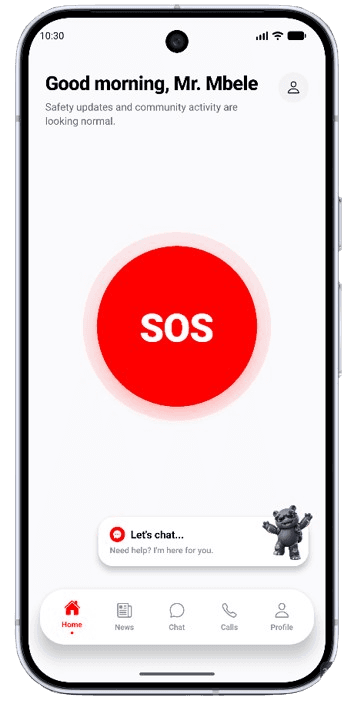
The Home Screen is designed around a prominently positioned SOS control. The button is deliberately central and easy to identify, so you do not need to search through menus when under stress.
Activating SOS can initiate the emergency workflow configured in Havenly Solutions. Depending on the situation and available configuration, the workflow may involve:
- relevant trusted contacts
- community pathways
- emergency information
- configured responder integrations
- operational monitoring
Where supported and configured.
How SOS works
Five steps from the moment SOS is activated.
Activate SOS
Havenly Solutions identifies relevant emergency information
Configured people and pathways can be notified
Approved responders can receive necessary incident information where supported
The emergency workflow can be monitored and coordinated
The goal is coordinated communication, not unnecessary data sharing.
Stay connected to people you trust.
Users can establish relationships that may support messaging, voice calls and video calls. Communication is based on relationships and permissions, rather than exposing communication capabilities indiscriminately.
You decide who becomes part of your trusted network.
Messaging
Direct communication with people in your trusted network.
Voice calls
Relationship-based calling, subject to permissions.
Video calls
Relationship-based video, subject to permissions.
Built with resilience in mind.
Havenly Solutions includes work designed to provide additional emergency resilience where normal connectivity may be unreliable.
Offline SOS
Designed to support emergency handling in limited-connectivity conditions.
Bluetooth Relay
Supported nearby devices can participate in emergency relay pathways.
Background Emergency Support
Configured emergency and background mechanisms can support the overall workflow when available.
Designed to provide additional resilience, not a guarantee of connectivity or emergency response.
Connecting Havenly Solutions to approved response organizations.
Havenly Solutions manages the connection.
Integrations can be supported with categories such as:
External responders do not gain access to the entire Havenly Solutions system. They receive the relevant information required for the particular emergency workflow or service relationship.
Your safety matters. So does your privacy.
Controlled access
Different people and organizations have different permissions.
Purpose-based information sharing
Information should be shared for a specific purpose.
Data minimization
External providers should receive only the information relevant and necessary for an incident or service.
Operational control
Responder integrations are managed through controlled operational systems.
Havenly Solutions does not replace emergency services.
The app is designed to help users communicate and coordinate relevant emergency information. Where approved integrations are available, Havenly Solutions can connect emergency workflows with participating response organizations.
Be ready before you need it.
Havenly Solutions is building a connected safety and community experience designed to help people stay connected, informed and prepared.
Planned launch: 13 October 2026